MQTT Sparkplug B explained
Sparkplug B is a specification that sits on top of MQTT. It fixes the topic layout, the payload format and the rules for when devices announce themselves, so any Sparkplug host can read any Sparkplug device without custom mapping.
What Sparkplug adds to MQTT
Plain MQTT leaves topic names and payloads up to you. That works inside one project and falls apart across vendors. Sparkplug, maintained by the Eclipse Foundation, standardises three things:
- A topic namespace, so every message says which group, edge node and device it belongs to and what kind of message it is.
- A payload, a protobuf message holding a timestamp, a sequence number and a list of typed metrics.
- State management: devices announce everything they publish when they come online, and the broker tells everyone when they go offline.
Version 3.0 of the specification is also published as ISO/IEC 20237. The reference implementations live in the Eclipse Tahu project.
The spBv1.0 topic namespace
Every Sparkplug B topic follows the same pattern:
spBv1.0/{group_id}/{message_type}/{edge_node_id}[/{device_id}]

spBv1.0/EnergyCo/NBIRTH/substation-7
spBv1.0/EnergyCo/DDATA/substation-7/meter-01
spBv1.0/STATE/scada-primary
A group is a logical collection of edge nodes, often a
site or a line. An edge node is the gateway or PLC that
holds the MQTT connection. A device is something behind
the edge node, such as a meter or a drive, that has no MQTT connection of
its own. Subscribing to spBv1.0/# gets the whole namespace.
Sparkplug message types
| Type | Sent by | Meaning |
|---|---|---|
NBIRTH | Edge node | Node birth certificate. Every metric the node will publish, with names, aliases, datatypes and current values |
DBIRTH | Edge node | Device birth certificate. The same, for one device behind the node |
NDATA, DDATA | Edge node | Changed values for the node or a device |
NDEATH | Edge node's MQTT Will, usually delivered by the broker | The edge node has gone offline |
DDEATH | Edge node | A device behind the node has gone offline |
NCMD, DCMD | Host application | Commands to a node or device, such as a rebirth request or a setpoint write |
STATE | Host application | Whether a host application, such as a SCADA system, is online |
Births, deaths and bdSeq
When an edge node connects, it registers an NDEATH message as its MQTT Last Will, then publishes an NBIRTH and a DBIRTH for each device. If the node drops off the network, the broker publishes the NDEATH on its behalf once it notices, on a socket error or when the keep-alive runs out, so every subscriber learns the node is offline without polling it.
Both the NBIRTH and the NDEATH carry a metric called bdSeq,
the birth/death sequence number. It goes up by one each time the node
connects. A host uses it to match a death to the right birth, so a late
NDEATH from an old session cannot mark a freshly reconnected node offline.
Aliases: why data messages have no names
Metric names such as Line 1/Filler/Motor/Current are long, and
sending them with every value wastes bandwidth. So the birth maps each
name to a numeric alias, and data messages can carry just the alias and
the value:
NBIRTH  metrics: [{ name: "Volts/L1", alias: 3, datatype: Float, value: 239.9 }, ...]
NDATA   metrics: [{ alias: 3, value: 240.2 }]
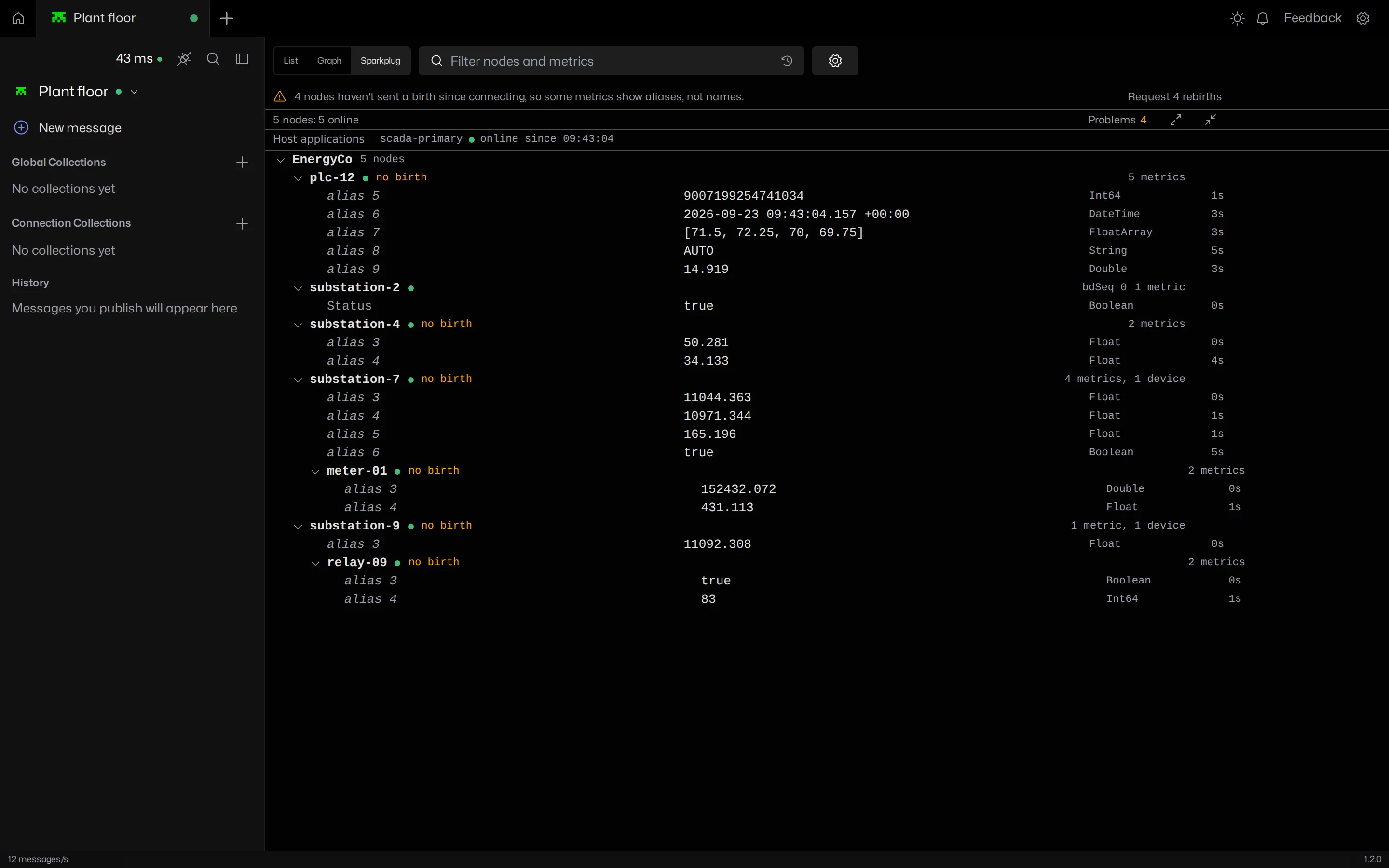
To read the NDATA you need the NBIRTH. A client that connected after the
birth, or that decodes each message on its own, only ever sees
alias 3. An alias must be unique across the edge node's whole
set of metrics, its devices included. A new birth replaces the whole alias
table.
MQTT Viewer's Sparkplug view keeps every birth for the session and fills the names back in, in the tree and in the decoded payload.
Sequence numbers
Every message from an edge node after its NBIRTH, except the NDEATH,
carries a seq
number that counts from 0 to 255 and wraps. The NBIRTH itself carries 0.
Node and device messages share one counter per node. A jump in the
sequence means messages were lost or arrived out of order, and a strict
host application will request a rebirth to resynchronise.
Rebirth requests
A host that missed a birth, or saw a seq gap, asks the node to start over by publishing an NCMD with one Boolean metric:
topic:   spBv1.0/EnergyCo/NCMD/substation-7
metric:  { name: "Node Control/Rebirth", datatype: Boolean, value: true }
The node answers with a fresh NBIRTH and a DBIRTH for each device. Every subscriber sees the new births, not only the one that asked.
Host applications and STATE
A host application, typically a SCADA or MES system, publishes its own
state as a retained message. In Sparkplug 3.0 the topic is
spBv1.0/STATE/{host_id} and the payload is JSON
with online and timestamp. Earlier versions used
STATE/{host_id} with a plain
ONLINE or OFFLINE string. Edge nodes can be
configured to wait for their primary host before publishing, so data is
not lost while the host is down.
Metric datatypes
Each metric declares a datatype in the birth: signed and unsigned integers from 8 to 64 bits, Float, Double, Boolean, String, Text, UUID, DateTime, Bytes and File, plus DataSet for tables and Template for user defined types. Sparkplug 3.0 adds array types such as FloatArray and BooleanArray. Metrics carry flags for null, historical and transient values, and a property set: Quality is defined by the specification, and many platforms add engineering units by convention.
Common Sparkplug faults
| Symptom | Usual cause |
|---|---|
| Metrics show as aliases or numbers | The client connected after the birth. Request a rebirth |
| A node births over and over | Two edge nodes share an MQTT client ID and keep knocking each other off, or the host and node disagree and request rebirths in a loop |
| Sequence gaps | Messages lost on a flaky link, QoS 0 under load, or two publishers on the same node ID |
| Node stays offline after reconnecting | A late NDEATH from the old session that the host does not check against bdSeq |
| A dead node looks online to new subscribers | A retained NBIRTH, which the specification forbids |
| Nothing arrives at all | Edge node waiting for its primary host's STATE, or ACLs blocking spBv1.0/# |
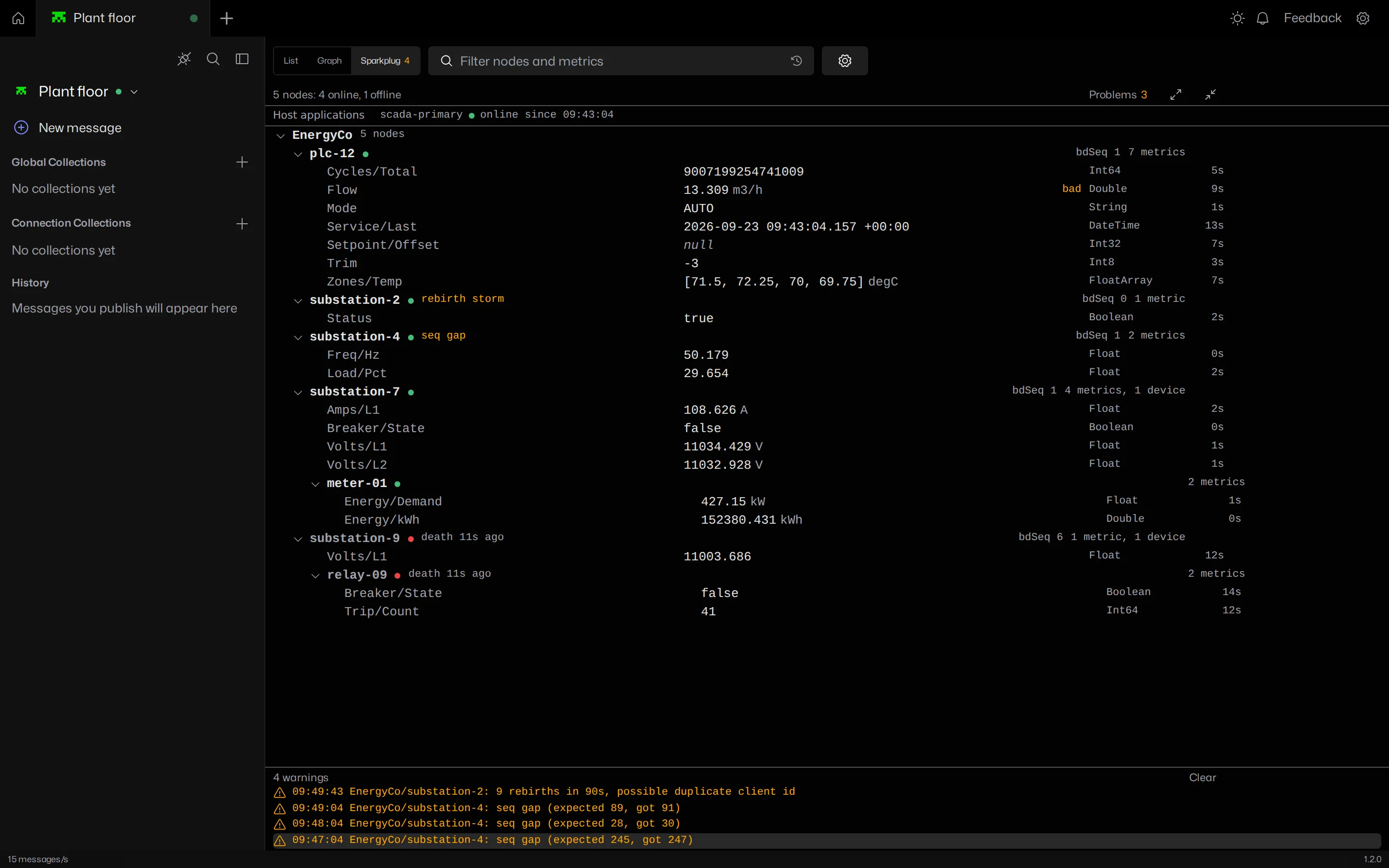
MQTT Viewer flags seq gaps and rebirth storms on the affected node, shows which nodes are offline and since when, and lists host applications from their STATE messages.
Watching a Sparkplug network
Any MQTT client can subscribe to spBv1.0/#, but a plain client
shows binary protobuf. To read it you need a client that decodes Sparkplug
and, to see names rather than aliases, one that keeps the births.
MQTT Viewer is free and does both. It subscribes and watches without acting as a host application, so it is safe to point at a production broker next to Ignition or another SCADA system. It only publishes when you ask it to request a rebirth.
Frequently asked questions
What is MQTT Sparkplug B?
Sparkplug B is an open specification from the Eclipse Foundation that defines a topic namespace, a protobuf payload and session state rules on top of MQTT, so industrial devices and SCADA systems can share data without custom integration. Version 3.0 is also published as ISO/IEC 20237.
What is the Sparkplug B topic format?
spBv1.0/{group_id}/{message_type}/{edge_node_id}/{device_id}. The device segment is only present for device messages such as DBIRTH and DDATA. Host applications publish STATE on spBv1.0/STATE/{host_id}.
Why do Sparkplug data messages show aliases instead of names?
Edge nodes may send each metric's name only once, in the birth certificate, and use a numeric alias in every data message after that. A client that missed the birth, or decodes each message on its own, sees only the alias. Keep the birth for the session, or send a rebirth request.
How do you request a Sparkplug rebirth?
Publish an NCMD to spBv1.0/{group_id}/NCMD/{edge_node_id} with a Boolean metric named Node Control/Rebirth set to true. The edge node answers with a fresh NBIRTH and a DBIRTH for each device.
What is the difference between Sparkplug A and Sparkplug B?
Sparkplug A (spAv1.0) was the first version, built on the Eclipse Kura payload. It is deprecated. Sparkplug B (spBv1.0) replaced it with its own protobuf schema, more datatypes, aliases, datasets and templates, and is the version in use today.
How do you view Sparkplug B messages?
Subscribe to spBv1.0/# with a client that decodes the protobuf payload. A plain MQTT client shows binary. MQTT Viewer decodes Sparkplug B, fills metric names in from the birth, and shows the network as a live tree of groups, edge nodes, devices and metrics.
Decode Sparkplug B in MQTT Viewer with the illustrated walkthrough.
MQTT Viewer is free and open source, and runs on macOS, Windows and Linux.
Download MQTT Viewer