Sparkplug B viewer with metric names, not aliases
Sparkplug B edge nodes can send each metric's name once, in the birth, and only a numeric alias after that. MQTT Viewer remembers every birth, fills the names back in, and shows the whole network as a live tree of groups, edge nodes, devices and metrics.
Try it in MQTT Viewer
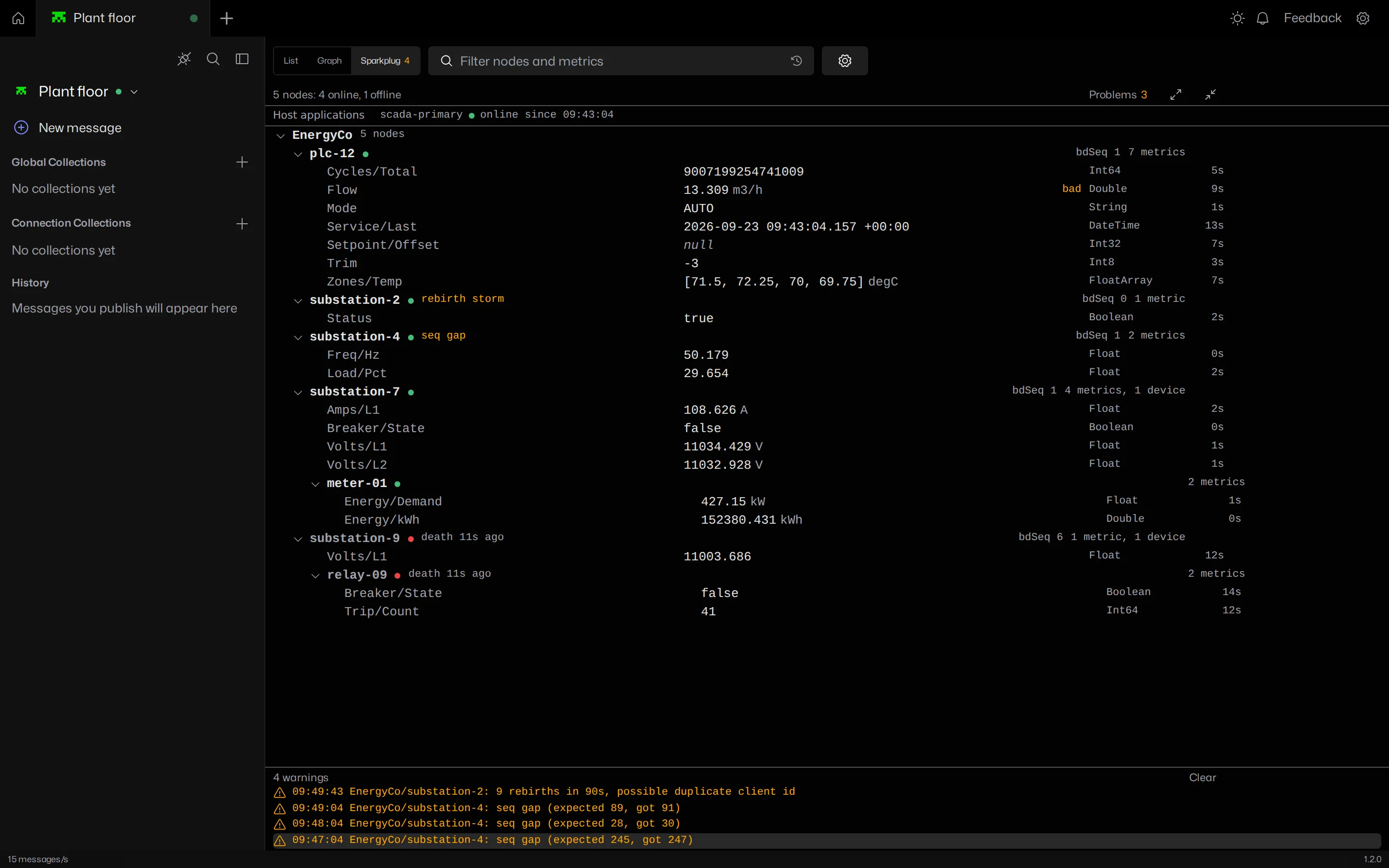
See the metric names, not the aliases
An edge node sends its full metric list once, in NBIRTH and DBIRTH. Nodes that use aliases then send NDATA and DDATA messages with only an alias number and a value. A client that decodes each message on its own shows alias 3 where Volts/L1 should be.
MQTT Viewer keeps the birth for every edge node and device on the connection and resolves each data message against it. Node and device aliases are tracked separately, and a new birth replaces the old alias table rather than merging into it, so names never go quietly stale.
Names are filled into the stored payload too. Select any Sparkplug message in the topic tree and the payload tab shows the metric names, with a note saying which birth they came from.
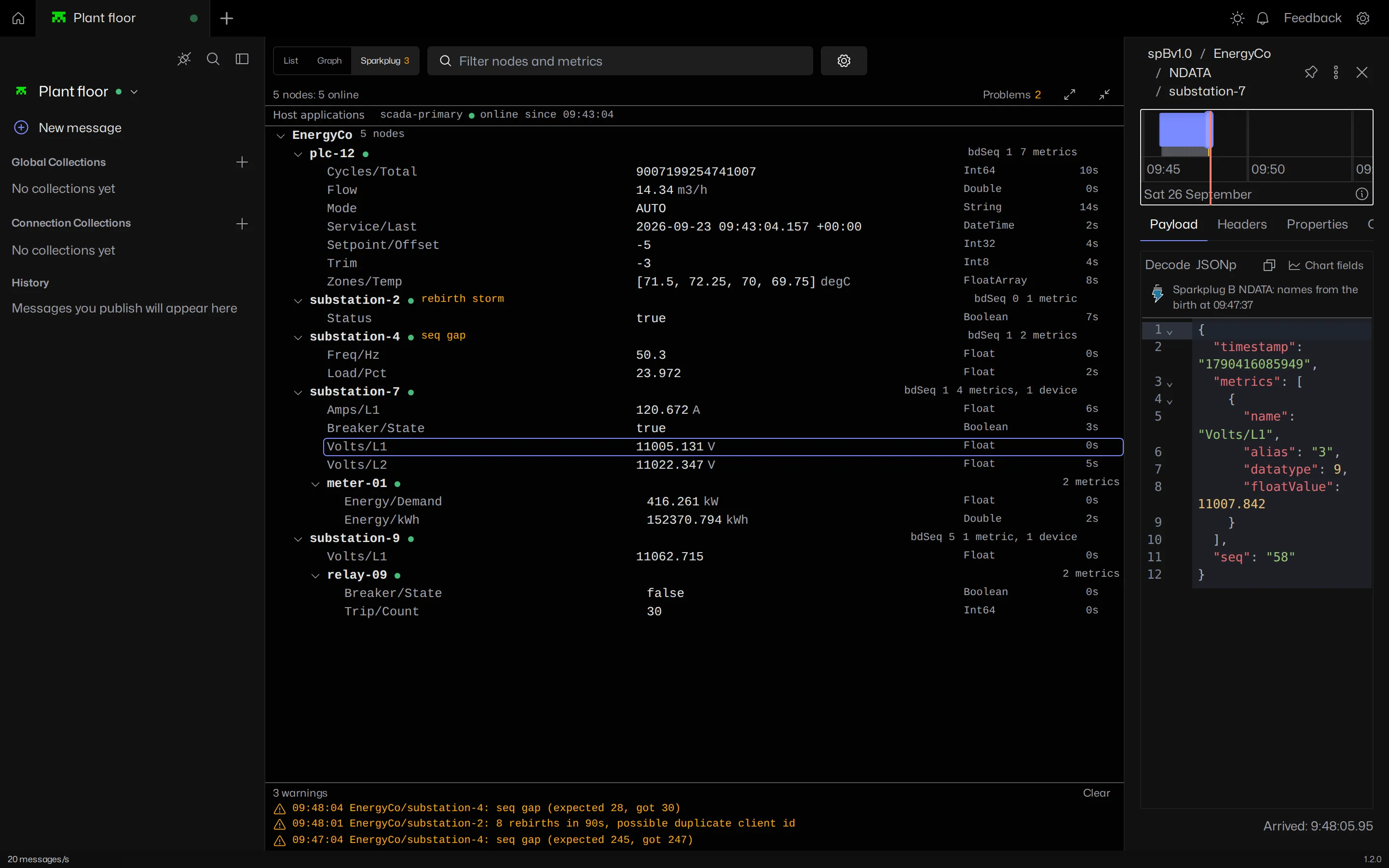
The whole network in one tree
Open the Sparkplug view from the switch above the topic tree. It lists every group, edge node, device and metric seen on the connection, updated live.
- Each metric shows its value, unit, datatype and how long ago it changed. Values are formatted by datatype, including exact 64-bit integers, DateTime with its offset, and Sparkplug 3.0 arrays.
- Bad, uncertain and stale quality, and the historical, transient and null flags, show next to the value instead of being dropped.
- Edge nodes show their bdSeq, metric and device count, and whether they are online, offline (with how long since the death certificate) or unknown.
- Host application STATE messages show in a strip above the tree, in both the Sparkplug 3.0 and the older format.
- Search takes metric names,
Group/Nodepaths, alias labels and pasted Sparkplug topics. - Click a metric to open the message that last set it.
Seq gaps, rebirth storms and offline nodes
Sparkplug messages carry a sequence number that cycles from 0 to 255. A gap means messages were lost or reordered between the edge node and the broker. MQTT Viewer checks every message and flags the node when the sequence breaks.
An edge node that keeps sending births is usually fighting another client with the same client ID, or stuck in a rebirth loop with a host application. Repeated births in a short window are flagged as a rebirth storm.
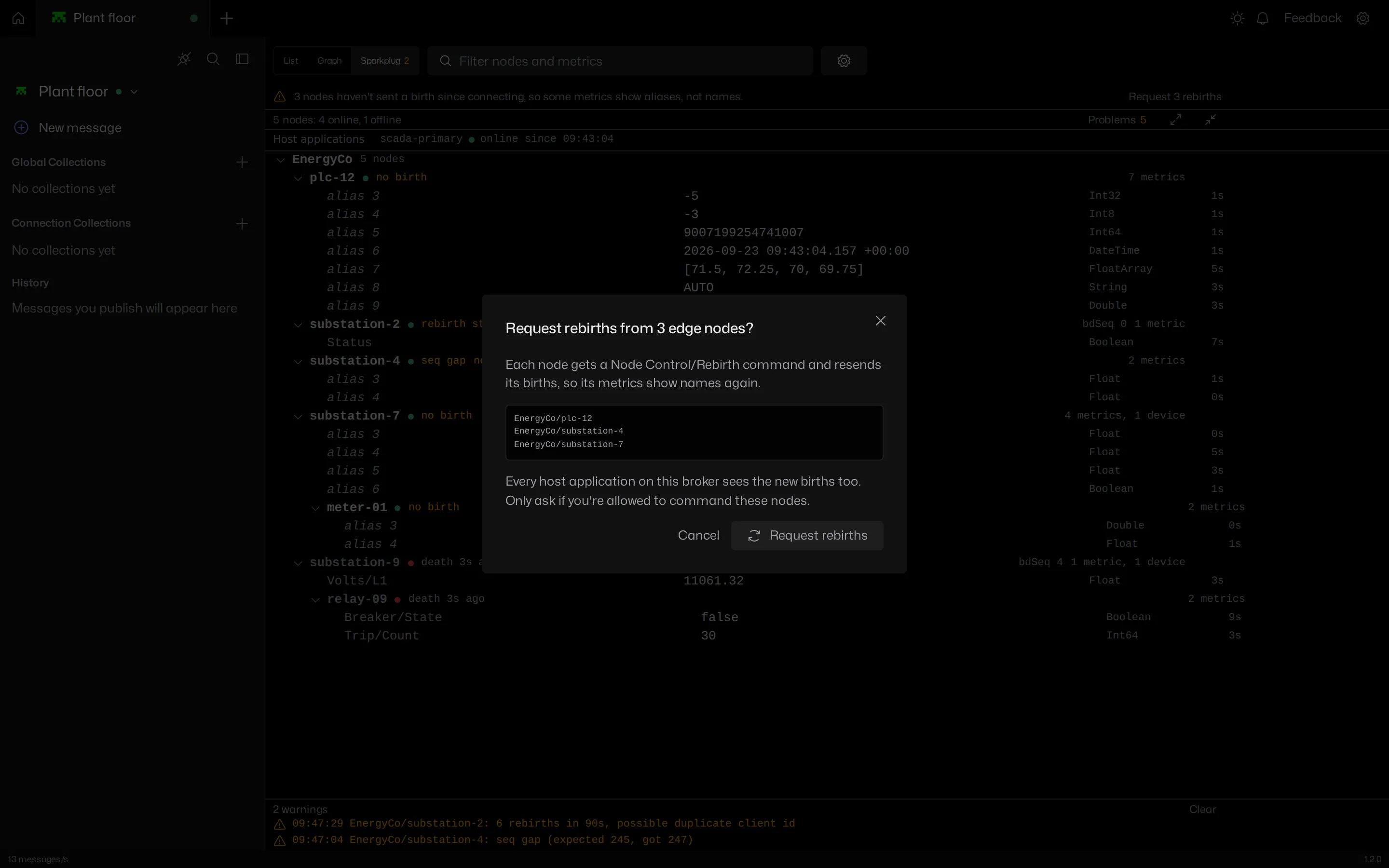
Press Problems to show only the nodes that need attention: offline, a seq gap or rebirth storm, metrics without names, or a device offline or waiting for its birth. The warnings strip keeps a timestamped list.
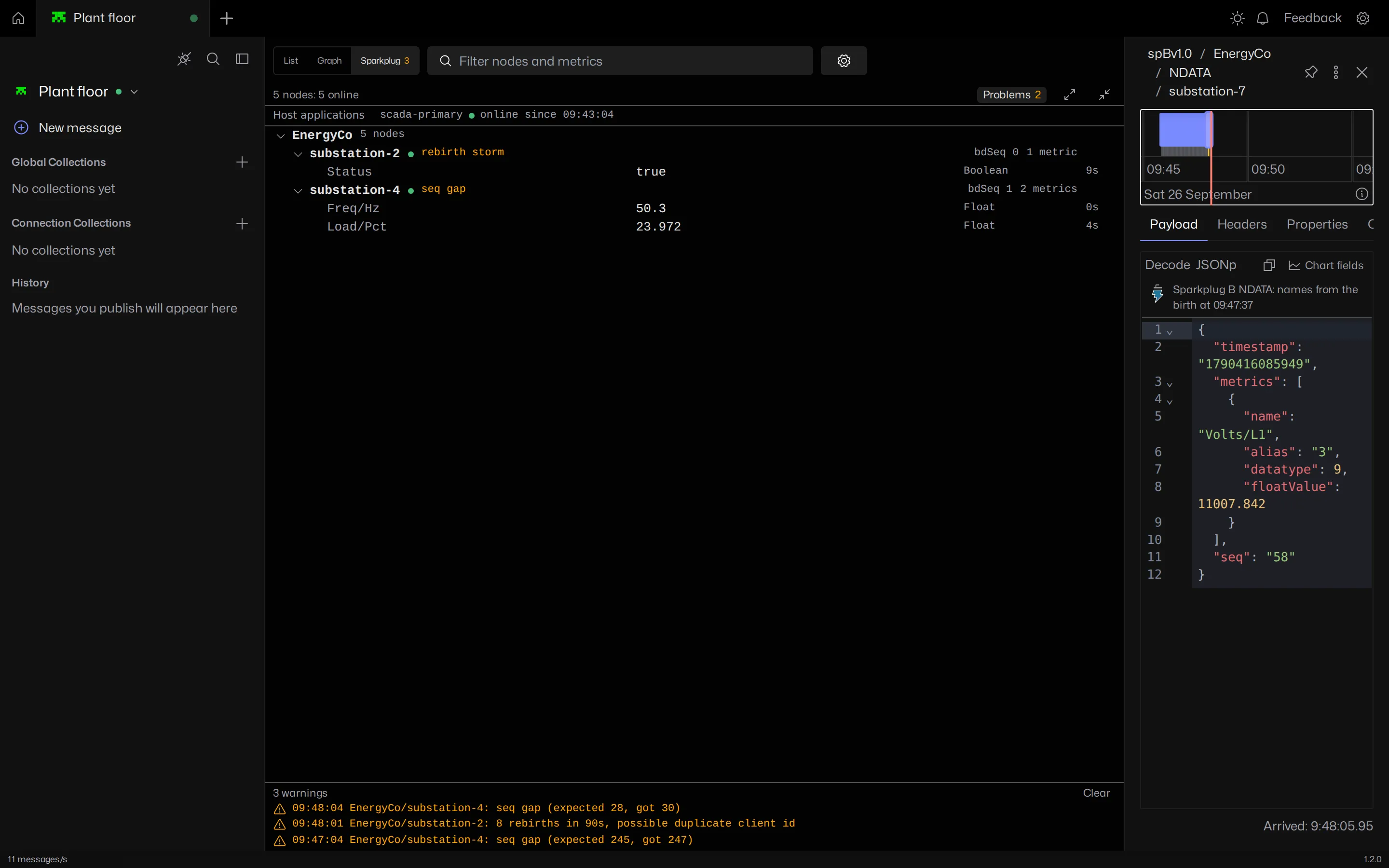
Request a rebirth when you connected after the birth
Births are only sent when an edge node connects or is asked for one. If MQTT Viewer connects after that, the node's data messages arrive with aliases and nothing to resolve them against. The view says which nodes are affected and offers to request a rebirth.
A rebirth request publishes the standard NCMD Node Control/Rebirth command. MQTT Viewer always asks first and lists the nodes, because every host application on the broker sees the new births too.
A viewer, not a host application
MQTT Viewer subscribes and watches. It never publishes a STATE message, never claims to be a primary host, and sends nothing to your edge nodes unless you request a rebirth. It can sit on a production broker next to Ignition or any other SCADA host without changing how the network behaves.
When the connection drops, the view freezes at the moment of the drop. After reconnecting, node states read unknown until each node is heard from again, and names read unverified until the next birth, rather than guessing.
Built for large Sparkplug networks
Memory is bounded per connection, with caps on nodes, devices, metrics and alias tables. At the node cap the least recently heard node is dropped first, offline ones before online ones. The view does no payload decoding while it is hidden.
It was tested with two brokers at about 2,000 messages a second each, one of them carrying 500 edge nodes with 50 metrics each, and the app stayed smooth with the Sparkplug view open.
Turn it on
Turn on "Automatically encode/decode Sparkplug messages" in the connection settings. Or, once Sparkplug traffic shows up in the tree, open the Sparkplug view and press Turn on and reconnect. Payloads are decoded by topic, only under spBv1.0/ and spAv1.0/, never by guessing from the payload, so plain text and JSON on other topics are left alone.
The Sparkplug B guide covers the topic namespace, births, deaths and aliases.
Frequently asked questions
Does MQTT Viewer resolve Sparkplug B aliases to metric names?
MQTT Viewer keeps the NBIRTH and DBIRTH for every edge node and device and fills the metric names into NDATA and DDATA messages that only carry aliases. The names show in the Sparkplug view and in the payload tab.
Why does a Sparkplug client show aliases instead of metric names?
Sparkplug B sends metric names only in the birth certificate. If the client connected after the birth, or decodes each message on its own, it has nothing to resolve the aliases against. MQTT Viewer keeps births for the session and can request a rebirth for nodes it missed.
Is MQTT Viewer a Sparkplug host application?
MQTT Viewer is a passive viewer. It never publishes STATE or claims to be a primary host, and it only sends a command when you request a rebirth, after a confirmation.
Can MQTT Viewer detect Sparkplug sequence gaps and rebirth storms?
Every Sparkplug message's seq number is checked, and gaps are flagged on the edge node with a timestamped warning. Repeated births in a short window are flagged as a rebirth storm, which usually means a duplicate client ID.
Which Sparkplug versions does MQTT Viewer support?
The Sparkplug view covers Sparkplug B (spBv1.0), including Sparkplug 3.0 datatypes and both STATE formats. Sparkplug A payloads decode to JSON in the payload tab.
Related features
MQTT Viewer is free and open source, and runs on macOS, Windows and Linux.
Download MQTT Viewer